

Choosing a new office chair can feel surprisingly complicated. One model promises lumbar support, another highlights a synchro mechanism, while a third focuses on breathable mesh or adjustable arms. But what do these features actually do, and which ones matter most for your body and your working day?
The best ergonomic office chairs are not simply attractive or heavily padded. They help you maintain a comfortable, balanced posture while allowing you to move, adjust your position and work efficiently. As the Canadian Centre for Occupational Health and Safety explains, a chair only becomes truly ergonomic when it suits your body, your workstation and the tasks you perform.
Before diving into the specifics, let’s look at the key features you should understand before buying.
1. Seat height adjustment: start with the correct foundation
Seat height is one of the most important adjustments because it affects your entire working posture.
When your chair is set correctly:
- Your feet rest flat on the floor or on a suitable footrest.
- Your knees and hips are comfortably open, generally around 90–110 degrees.
- Your thighs are supported without pressure behind the knees.
- Your arms can reach the desk without raising your shoulders.
If your seat is too high, your feet may dangle and pressure can build under your thighs. If it is too low, your knees may sit too high and your working position can feel cramped.
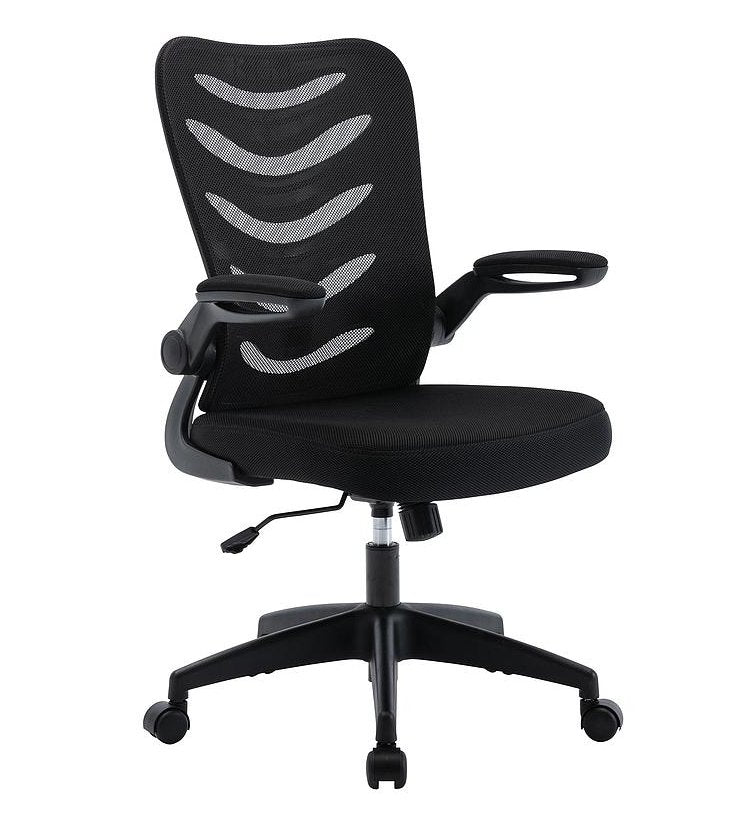
Look for a chair with a smooth, easy-to-use height adjustment and a range that suits your leg length. For example, the Camden Ergonomic Office Mesh Chair has a stated seat height range of 50–59.5cm.
Buyer check: Sit fully back in the chair and adjust the height until your feet are supported and your thighs feel relaxed. If you cannot reach the floor at the lowest setting, consider using a footrest or choosing a different chair.
2. Lumbar support: support your lower back’s natural curve
Lumbar support is designed to support the inward curve of your lower spine. Without suitable support, you may gradually slump or lean forward, placing additional strain on your back and neck.
The ideal lumbar support should:
- Sit in the small of your back, around the belt-line area or slightly higher.
- Support your natural curve without forcing you into an exaggerated arch.
- Feel firm enough to provide support, but not create a hard pressure point.
- Ideally adjust vertically and, on more advanced models, in depth or pressure.
A fixed lumbar cushion can work well if its position matches your body. However, adjustable lumbar support gives you greater flexibility, particularly if the chair will be used by several people in a business environment.
Why it matters: A supportive backrest can make it easier to sit back in the chair rather than perching on the front edge. That helps distribute pressure more evenly across your back, pelvis and thighs.
3. Seat depth: allow your legs to be supported without pressure
Seat depth is the distance from the front edge of the seat to the backrest. It is often overlooked, but it makes a major difference to comfort.
A seat that is too deep can press into the backs of your knees. This may make you slide forward, leaving your lower back unsupported. A seat that is too shallow may not provide enough support beneath your thighs.
With your back against the backrest, aim to have a small gap, around 2–4cm, between the seat edge and the back of your knees. This allows your legs to remain supported without restricting circulation or creating uncomfortable pressure.
Seat-depth adjustment is particularly useful in shared offices, where employees may have different leg lengths. If you are buying a fixed-depth chair for home use, check the published seat dimensions carefully. The Merlin Mesh Back Chair, for instance, lists a 520mm seat depth.
Buyer check: Do not judge seat depth while sitting on the very front of the chair. Sit fully back first, then check the clearance behind your knees.
4. Armrests: relax your shoulders and position your hands naturally
Armrests can reduce the load on your shoulders and upper back, but only when they are adjusted correctly.
Ideally, armrests should allow you to:
- Keep your shoulders relaxed rather than raised.
- Position your elbows comfortably close to your body.
- Rest your forearms lightly when reading or using a mouse.
- Move close enough to your desk without the armrests colliding with it.
Height-adjustable arms are a useful minimum. Width, pivot and forward/back adjustment can provide an even better fit, especially for taller users or people who change tasks throughout the day.
That being said, armrests are not always helpful in every situation. If they prevent you from moving close enough to the desk, they may encourage you to lean forward. Flip-up arms, such as those featured on the Merlin Mesh Back Chair, can be useful when you need extra flexibility or want to store the chair beneath the desk.
5. Tilt mechanism and recline: avoid sitting rigidly in one position
Your body is not designed to remain completely still for hours. A good tilt mechanism allows you to change position, recline while reading or taking a call, and reduce the feeling of being locked into one posture.
Look for:
- A backrest or seat tilt function.
- Adjustable tilt tension, so the chair responds appropriately to your body weight.
- A locking function or recline limiter where required.
- Smooth movement that maintains contact with your back.
A free-floating or dynamic tilt can encourage small movements throughout the day. For focused keyboard work, many people prefer an upright or slightly reclined position. When reading or thinking, a little more recline can feel more comfortable.
The Merlin Mesh Back Chair includes a tilt lock mechanism and torsion control knob, allowing the user to lock the chair upright or adjust the resistance when reclining.
In short: The best tilt mechanism is one you can adjust easily and use naturally. It should support movement, not make the chair feel unstable.
6. Backrest design: look beyond height alone
A high backrest is not automatically an ergonomic backrest. What matters is how well it supports your spine while allowing reasonable movement.
Check whether the backrest:
- Follows the natural shape of your back.
- Supports both the lower and upper back.
- Is wide enough for comfortable movement.
- Offers height or angle adjustment where possible.
- Avoids hard edges or pressure points.
- Keeps supporting you when you recline.
Mesh backrests are popular because they allow airflow and can flex slightly as you move. Upholstered fabric backrests can provide a softer, warmer feel. Your choice should reflect your working environment, personal preference and the amount of time you spend seated.
For example, a breathable mesh chair may suit a warm home office or busy open-plan office. In a laboratory or workshop, a wipe-clean surface may be more practical.
7. Materials and seat cushioning: balance comfort with practicality
Materials affect temperature, pressure distribution, maintenance and long-term durability.
Mesh
Mesh can improve airflow and reduce heat build-up around the back. It is often a practical choice for modern offices and home workstations.
Fabric
Fabric upholstery offers a softer, warmer feel and is available in a wide range of colours. It can be a comfortable choice for long periods of desk work.
Vinyl or polyurethane
These materials are easier to wipe clean, making them particularly useful in laboratories, workshops, factories and other environments where hygiene or spill resistance matters.
The seat should have enough cushioning to support you without collapsing. A gently rounded or “waterfall” front edge can reduce pressure beneath the thighs.
But don’t worry if your budget does not stretch to every premium feature. A well-fitted chair with reliable height adjustment, appropriate seat dimensions, a supportive backrest and a stable base can be a much better choice than an expensive chair that does not suit your body.
8. Weight capacity, base and stability: confirm the specification
Always check the manufacturer’s stated weight capacity before buying. This is important for safety, performance and durability, particularly where a chair will be used for long hours or by multiple people.
For guidance, the Camden chair lists a maximum load of 120kg, while the Merlin chair lists a weight tolerance of 20 stone. These figures are product-specific, so do not assume that one model’s rating applies to another.
Also look for:
- A stable five-star base.
- A suitable gas lift.
- Smooth, appropriate castors.
- A base designed for your flooring.
- A clear warranty or guarantee.
- Published dimensions and usage information.
A chair with castors is useful for moving around a workstation, but a stationary chair may be more suitable for certain industrial tasks. In laboratories and factories, consider whether the chair needs a wipe-clean finish, braking castors, an ESD-safe specification or additional resistance to frequent cleaning.
How ergonomic principles apply to draughtsman chairs and industrial seating
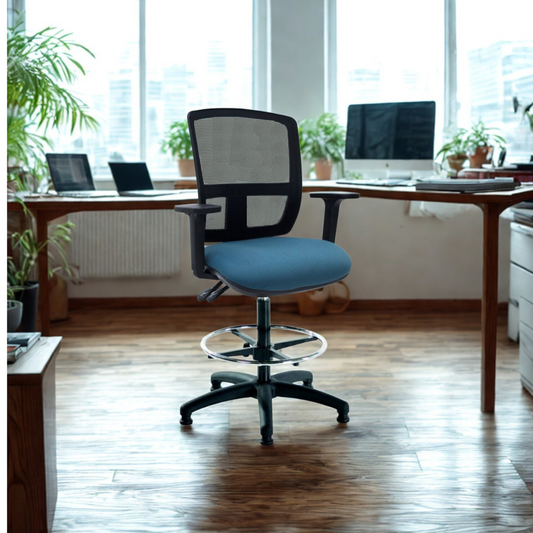
Ergonomics does not stop at conventional office chairs. The same principles apply to draughtsman chairs, which are designed for high desks, counters, drafting tables and laboratory benches.
A good draughtsman chair should provide:
- Height adjustment that matches the elevated work surface.
- A supportive backrest.
- A foot ring to support the feet.
- Suitable seat depth and cushioning.
- A stable five-star base.
- Materials suited to the working environment.
In labs, workshops and factories, the correct height is especially important. If the chair is too low for the bench, you may lean forward or raise your shoulders. If it is too high, your feet may lose support. Foot rings help, but they should not replace correct seat adjustment.
For demanding environments, explore specialist industrial seating, including wipe-clean polyurethane options and chairs designed for elevated workstations.
Your chair is only one part of the workstation
Even the best chair cannot correct an unsuitable desk or poorly positioned screen. Your chair should work alongside the rest of your office furniture.
Consider:
- Whether the desk allows enough legroom.
- Whether your monitor is at a comfortable viewing height.
- Whether your keyboard and mouse can be reached without stretching.
- Whether lighting creates glare or causes you to lean forward.
- Whether you can alternate between sitting, standing and moving.
Chilli Seating’s wider range of office furniture can help you build a more complete workstation for a business office or home working space.
Final buyer checklist
Before you commit to a chair, ask:
- Can I adjust the seat height so my feet are supported?
- Does the lumbar support contact my lower back comfortably?
- Is there a small gap behind my knees?
- Can I keep my shoulders relaxed when using the armrests?
- Does the tilt mechanism move smoothly?
- Are the materials suitable for my environment?
- Is the weight capacity clearly stated?
- Will the chair work with my desk and daily tasks?
- For high workstations, would a draughtsman chair be more appropriate?
- Can I test or trial the chair before buying several for a team?
A well-chosen chair can support comfort, concentration and long-term wellbeing. Whether you are furnishing a corporate office, laboratory, factory or home workstation, focus on fit and adjustability rather than marketing labels alone. In short, the right chair is one that works with your body, your desk and the way you work every day.