

A meeting room makes an impression before anyone says a word. Scratched frames, mismatched chairs or seats that become uncomfortable halfway through a discussion can distract clients and leave your team shifting in their seats.
The right meeting room chairs balance professional style with practical comfort. Before diving into the specifics, think about who uses the room, how long meetings last and what people need to do while seated. That gives you a clearer way to choose seating that works day after day.
Step 1: Match the chair to the meeting
A quick client catch-up has different demands from a two-hour planning session. Start by considering the room’s main purpose and the typical length of time people sit.
- For short meetings and visitor seating: A smart, supportive chair with a simple frame may be sufficient.
- For regular team meetings: Look for comfortable padding and back support, particularly if people tend to stay seated for an hour or more.
- For workshops and laptop-based meetings: Consider chairs that allow more adjustment and movement, similar to ergonomic office chairs.
- For flexible rooms: Stackable or lightweight chairs can make it easier to clear space, but check that their comfort and stability suit their expected use.
A chair that looks right but does not suit the task can frustrate users. The Health and Safety Executive’s Seating at work guidance recommends considering both the person using the seat and the work being carried out. That is a helpful principle for shared meeting rooms, where users may vary in height, build and comfort preferences.
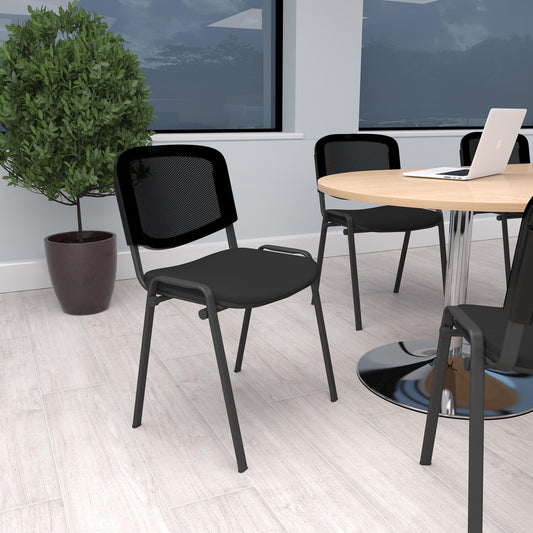
Step 2: Put comfort and fit first
Comfort depends on more than thick cushioning. A seat should support a relaxed posture without making it difficult to move, reach the table or stand up.
When comparing options, check for:
- A supportive backrest: The HSE recommends support for the lower and middle back. A backrest that permits some movement can be more comfortable than one that holds every user in a rigid position.
- A suitable seat depth: People should be able to sit back against the backrest without the front edge pressing into the backs of their knees.
- A shaped, padded seat edge: A rounded front edge can help reduce pressure on the thighs.
- An appropriate seat height: Users should be able to sit comfortably with their feet supported. For shared rooms, adjustable height can make it easier to accommodate different people.
- Comfortable upholstery: Choose a finish that feels pleasant for the expected meeting length and is practical to clean.
An academic study on meeting-chair comfort explored how backrest structure affects people’s experience of sitting. It is a useful reminder that design details influence how supportive a chair feels, not just how it looks (study in International Journal of Affective Engineering).
For meetings that involve extended laptop or document work, a fixed visitor chair may not offer enough flexibility. In those cases, an adjustable chair can be a better choice. But don’t worry: more adjustment is not automatically better for every room. Focus on what people actually need, and make sure the controls are easy to understand.
Step 3: Check armrests, movement and table clearance
Armrests can make it easier to relax or sit down and stand up, but they need to work with the meeting table. Bulky or fixed arms may stop people pulling their chairs close enough, or prevent the chairs from fitting beneath the table.
Before you order, check:
- Will the arms clear the underside of the table?
- Can people sit close enough to write or use a laptop comfortably?
- Is there enough space between chairs for people to enter and leave?
- Would a swivel base help participants turn between colleagues or a screen?
- Would glides be a quieter, steadier choice for a formal boardroom?
The HSE seating guidance notes that armrests can restrict movement and should suit the task and workstation. That is particularly relevant in meeting rooms, where people need to move naturally between conversation, note-taking and standing.
Think about the floor, too. Select castors or glides that suit the surface and consider whether chair movement is likely to create distracting noise. A chair that moves smoothly and quietly helps meetings feel more settled.
Step 4: Choose a style that feels considered
Clients do notice the room’s details. A consistent set of clean, well-maintained chairs can make a space feel welcoming and professional. You do not need an extravagant design to achieve that effect; the finish, proportions and condition all matter.
Consider how the chairs will work with:
- The meeting table and other office furniture
- Your existing colour palette and brand
- The room’s size and the number of seats required
- The level of formality: a boardroom may call for a different look from a collaborative project room
Durable, easy-to-clean upholstery is a sensible choice for frequently used spaces. Mesh, fabric and leather-look finishes each have a different appearance and feel, so compare samples if you can. For a cohesive result, choose a consistent style or a coordinated family of chairs rather than mixing unrelated designs.
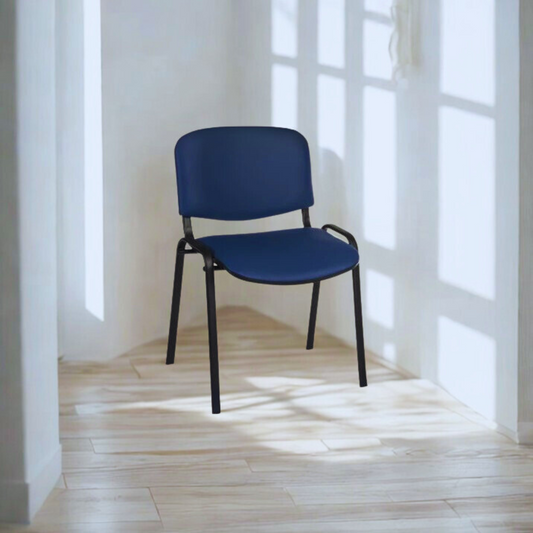
Step 5: Try chairs in the room before committing
A quick sit in a showroom can help you compare initial comfort, but a proper trial gives you more useful feedback. If possible, place a sample chair at the actual meeting table and ask a few different people to try it.
Encourage them to:
- Sit back and use the backrest.
- Turn to speak with someone beside them.
- Write or work on a laptop at the table.
- Pull the chair in and out.
- Stand up and sit down several times.
Ask whether anything presses behind the knees, whether the backrest feels supportive and whether the arms get in the way. The HSE also recommends user trials and feedback when assessing whether workplace seating is suitable. Testing in your own room can reveal practical issues that product photos cannot.
For larger projects, check dimensions, weight capacity, care instructions and any relevant product testing information with the supplier. BS EN 1335-1:2020 sets out dimensions and measurement methods for office work chairs; you can view the BSI standard’s scope. A standard is useful when comparing specifications, but it does not replace checking whether a particular chair suits your room and its users.
Step 6: Balance budget with long-term value
You do not have to choose the most expensive chair in the range to create a comfortable, professional room. A well-chosen, straightforward chair can be a good fit for shorter meetings, while a more adjustable model may be worthwhile for rooms used throughout the day.
When comparing price, consider more than the initial cost:
- How often will the chair be used?
- Does its construction suit the demands of your workplace?
- Can the upholstery be cleaned easily?
- Are replacement parts or maintenance support available?
- Will the chair still suit the room if meeting patterns change?
A low-cost option that needs frequent replacement may not be the best value. At the same time, adding features no one uses can stretch your budget without improving the room. In short, match the specification to the level of use.
You can browse different styles and configurations in our meeting chairs collection. For rooms that need more adjustable seating, explore our office chairs as well.
Make your meeting room work for everyone
The best meeting room chairs help your space look polished while allowing people to focus on the conversation, not their discomfort. Start with the room’s purpose, consider fit and support, check the interaction with your table, and test your shortlist with the people who will use it.
With a little planning, you can create a welcoming meeting space that supports client impressions and everyday team comfort, without compromising practicality or budget.